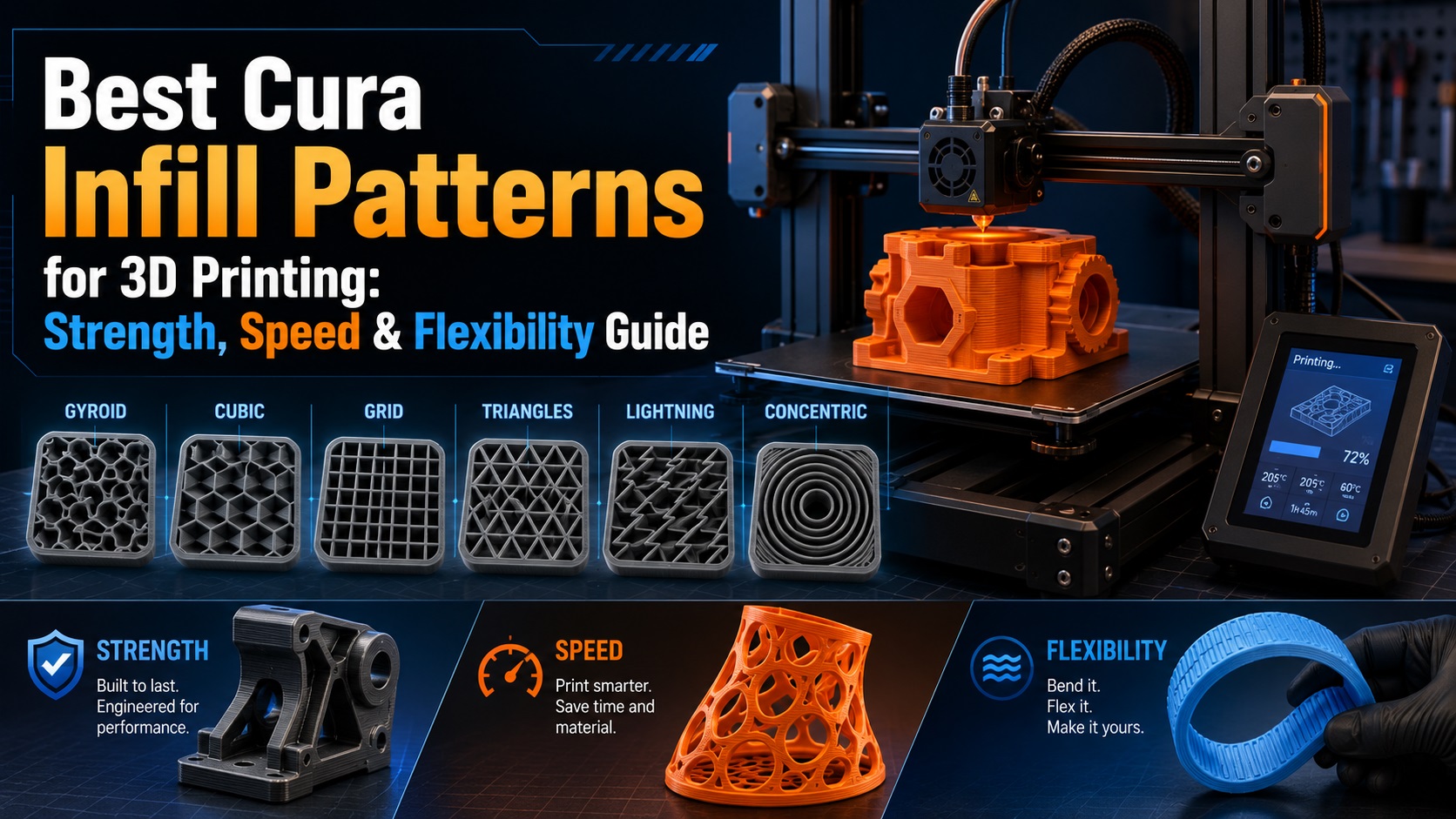
Infill is one of the most important settings in FDM 3D printing. It controls the internal structure of your printed part and has a direct effect on strength, weight, print time, material usage, and even flexibility.
Many beginners focus only on layer height, nozzle temperature, or print speed, but infill can completely change how a model performs. A decorative figure does not need the same internal structure as a functional bracket, and a flexible TPU part should not be printed with the same infill pattern as a rigid PLA tool.
In this guide, we will explain the most useful Cura infill patterns, when to use them, and how to choose the right settings for different types of 3D prints.
What Is Infill in 3D Printing?
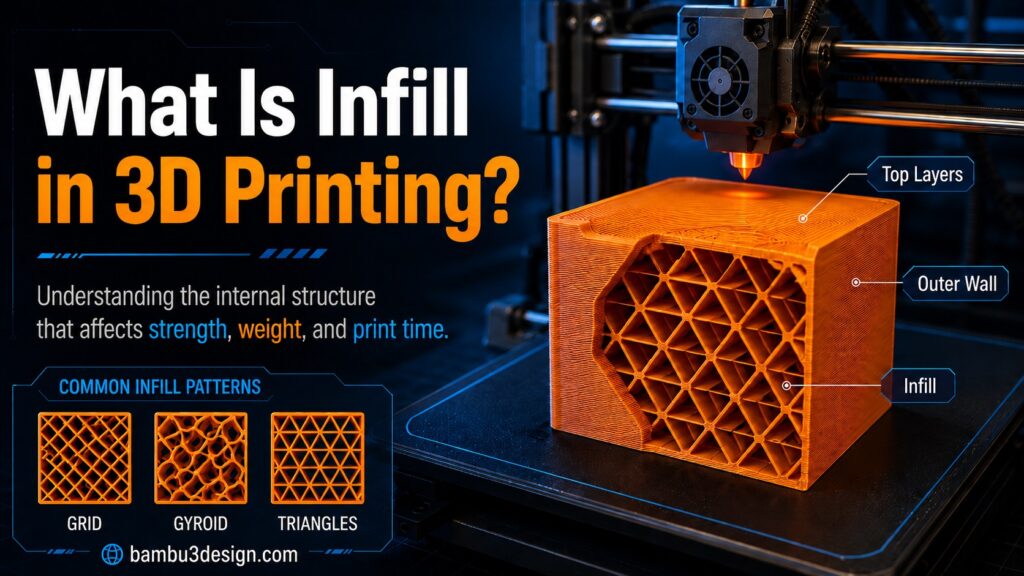
Infill is the internal pattern printed inside a 3D model. When a part is sliced in Cura, the outer walls create the visible shell, while the infill fills the inside of the object.
The infill density controls how much material is used inside the model. For example:
- 0% infill means the model is hollow.
- 10–20% infill is common for decorative or light-use parts.
- 30–50% infill is useful for stronger functional parts.
- 100% infill creates a fully solid part, but it is rarely necessary for normal printing.
Cura allows users to choose different infill patterns, and each pattern has its own advantages. Some are designed for speed, some for strength, and others for flexibility. UltiMaker Cura documentation notes that different infill patterns provide different benefits depending on the intended print application.
Why Infill Pattern Matters
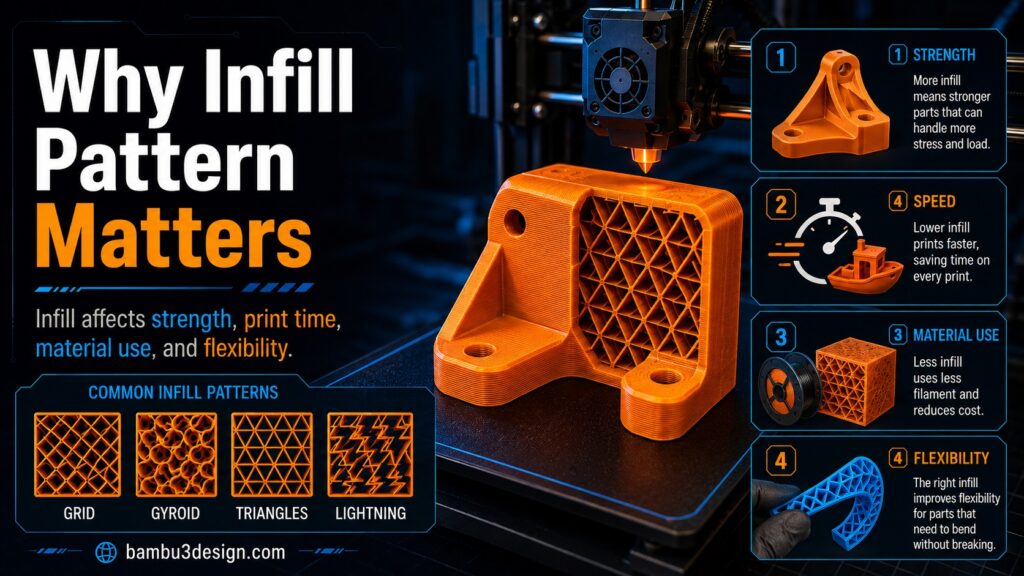
The infill pattern affects four main things:
1. Strength
Some patterns are stronger in one direction, while others provide more balanced strength in multiple directions. For example, Gyroid and Cubic patterns are often better for functional parts because they distribute internal support more evenly.
2. Print Time
Simple patterns such as Lines or Zig-Zag are faster to print because the nozzle follows less complex paths. More advanced patterns such as Gyroid or Octet usually take longer.
3. Material Usage
A low-density pattern can reduce filament consumption. This is especially useful for large decorative models, prototypes, and display pieces.
4. Flexibility
For flexible filaments like TPU, the wrong infill can make a part too stiff. Patterns such as Concentric, Cross, or Cross 3D are better when you want the object to bend or compress.
Best Cura Infill Patterns by Use Case
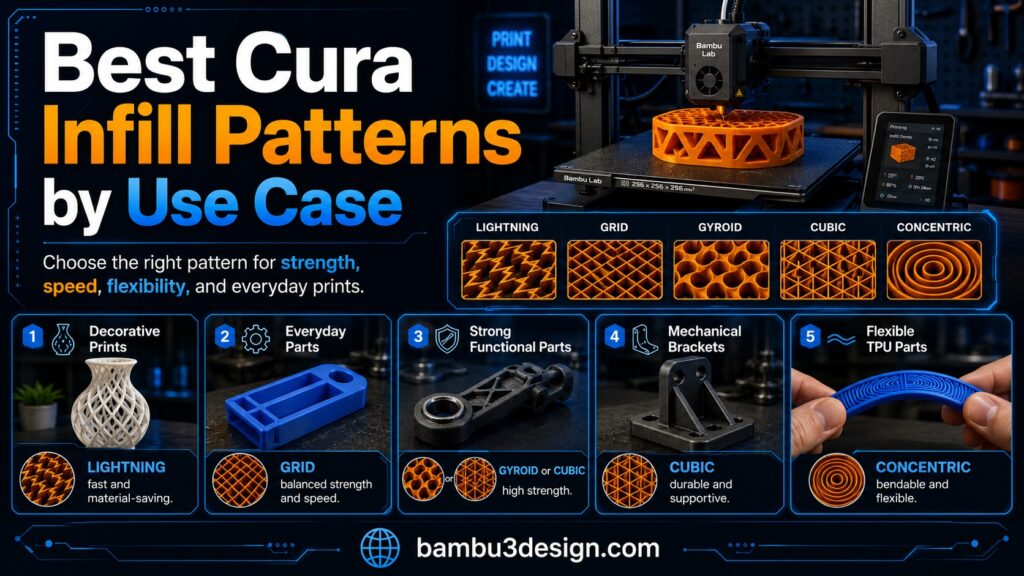
Choosing the right infill pattern depends on what you are printing. Below is a practical guide.
1. Lightning Infill: Best for Fast Decorative Prints
Lightning infill is ideal when you want to save filament and reduce print time. Instead of filling the entire inside of the model, it creates internal support only where needed, mainly under top surfaces.
This makes it excellent for:
- Decorative models
- Display pieces
- Large non-functional prints
- Figurines
- Prototypes where strength is not important
Lightning infill is not recommended for mechanical or load-bearing parts because it does not provide strong internal support throughout the whole model.
Best use: Decorative prints
Recommended density: 5–15%
Material: PLA, PETG
Avoid for: Functional parts, brackets, clips, tools
2. Lines Infill: Best for Quick and Simple Prints
Lines is one of the simplest infill patterns in Cura. It prints parallel lines inside the part, making it fast and efficient.
This pattern is good when you need a quick print and do not require high strength. It is also useful for test models and prototypes.
Best use: Fast prototypes and simple models
Recommended density: 10–25%
Material: PLA, PETG
Main advantage: Fast printing
Main limitation: Lower strength compared with 3D patterns
3. Zig-Zag Infill: Good for Speed and Easy Printing
Zig-Zag is similar to Lines, but the toolpath is more continuous. This can reduce travel moves and make printing smoother.
It is a good option for general prints that do not need maximum strength.
Best use: General-purpose prints
Recommended density: 10–25%
Material: PLA, PETG
Main advantage: Fast and simple
Main limitation: Not ideal for heavy mechanical loads
4. Grid Infill: A Good Standard Option
Grid is one of the most common infill patterns. It creates a strong two-dimensional internal structure and works well for many everyday prints.
It is stronger than Lines or Zig-Zag, but it can take more time to print. It is a good choice if you want a balance between strength, speed, and material use.
Best use: Everyday 3D prints
Recommended density: 15–30%
Material: PLA, PETG, ABS
Main advantage: Good balance
Main limitation: Not as strong in all directions as Cubic or Gyroid
5. Triangles Infill: Stronger for Rigid Parts
Triangles infill creates a triangular internal structure. Triangle-based geometry is naturally rigid, which makes this pattern a good option for parts that need more stiffness.
It is useful for:
- Mounts
- Holders
- Brackets
- Rigid prototypes
- Parts that need better structural support
Best use: Stronger rigid parts
Recommended density: 20–40%
Material: PLA, PETG, ABS
Main advantage: Good stiffness
Main limitation: Can increase print time
6. Tri-Hexagon Infill: Strong and Visually Efficient
Tri-Hexagon combines triangular and hexagonal shapes. It provides good strength and can be useful for functional prints where you want better internal support than basic Grid.
This pattern is a good middle option between simple infill and more advanced 3D patterns.
Best use: Functional parts with medium strength needs
Recommended density: 20–40%
Material: PLA, PETG, ABS
Main advantage: Good structural support
Main limitation: More complex than basic patterns
7. Cubic Infill: Best for Strong Functional Parts
Cubic infill creates a three-dimensional internal structure. Unlike simple 2D patterns, Cubic provides support in multiple directions, making it better for parts that experience force from different angles.
This is a strong choice for:
- Mechanical parts
- Tool holders
- Functional brackets
- Printer accessories
- Parts under compression or bending
Best use: Functional and mechanical prints
Recommended density: 30–60%
Material: PLA, PETG, ABS, Nylon
Main advantage: Good multi-directional strength
Main limitation: Longer print time than simple patterns
8. Cubic Subdivision: Strong but More Material Efficient
Cubic Subdivision is similar to Cubic, but it changes the internal cell size depending on the area of the model. This can reduce material use while still keeping useful strength.
It is a good option for larger functional parts where normal Cubic would use too much filament.
Best use: Large strong parts
Recommended density: 20–50%
Material: PLA, PETG, ABS
Main advantage: Saves material compared with full Cubic
Main limitation: Not always necessary for small models
9. Gyroid Infill: Best All-Round Pattern for Strength and Smooth Printing
Gyroid is one of the most popular infill patterns for functional 3D printing. It has a smooth, wave-like internal structure and provides strength in multiple directions.
One major benefit of Gyroid is that it prints with continuous curves rather than sharp internal corners. This can help create smoother toolpaths and more balanced internal support.
Gyroid is excellent for:
- Functional parts
- Parts under multi-directional stress
- PETG prints
- Mechanical prototypes
- Lightweight but strong components
Best use: Strong all-round functional prints
Recommended density: 20–50%
Material: PLA, PETG, ABS, Nylon
Main advantage: Excellent balance of strength, flexibility, and print quality
Main limitation: Can take longer than Grid or Lines
10. Octet and Quarter Cubic: Best for Advanced Strength
Octet and Quarter Cubic are advanced 3D infill patterns designed for stronger internal support. They are useful when mechanical performance is more important than print speed.
These patterns are better for experienced users who are printing parts that need improved load distribution.
Best use: Strong mechanical parts
Recommended density: 30–70%
Material: PETG, ABS, Nylon, engineering filaments
Main advantage: Strong internal structure
Main limitation: Longer print time and more material use
11. Concentric Infill: Best for Flexible and Decorative Parts
Concentric infill follows the shape of the outer walls. Instead of creating a grid-like internal structure, it prints lines that match the outline of the model.
This makes it useful for:
- Flexible parts
- TPU prints
- Decorative models
- Parts where surface shape matters more than internal strength
Concentric can help flexible prints bend more naturally, especially when printed with TPU.
Best use: Flexible and decorative prints
Recommended density: 10–30%
Material: TPU, PLA
Main advantage: Good flexibility
Main limitation: Not ideal for strong mechanical parts
12. Cross and Cross 3D: Best for Flexible TPU Prints
Cross and Cross 3D are designed to improve flexibility. They allow the printed part to compress and bend more easily compared with rigid infill patterns.
These patterns are especially useful for:
- TPU parts
- Soft grips
- Flexible cases
- Cushions
- Wearable parts
- Shock-absorbing prints
Best use: Flexible TPU prints
Recommended density: 10–30%
Material: TPU, TPE
Main advantage: Maintains flexibility
Main limitation: Not suitable for rigid load-bearing parts
Is Higher Infill Always Better?
No. A higher infill percentage does not always mean a much stronger part. In many cases, wall thickness has a bigger effect on strength than simply increasing infill.
For functional FDM parts, it is often better to increase:
- Wall line count
- Top and bottom thickness
- Print temperature tuning
- Layer adhesion
- Material choice
- Print orientation
For example, a PLA part with 4 walls and 30% Gyroid infill may perform better than a part with 2 walls and 60% infill.
Infill is important, but it should be adjusted together with wall thickness and print orientation.
Best Infill Pattern for PLA
For most PLA prints, the best Cura infill patterns are:
- Grid for general use
- Gyroid for stronger parts
- Lightning for decorative prints
- Triangles for rigid parts
If you are printing toys, figures, or display models, 10–15% Lightning or Lines infill is usually enough. For stronger PLA parts, 25–40% Gyroid or Cubic is a better choice.
Best Infill Pattern for PETG
PETG is often used for functional parts because it has better toughness than PLA. For PETG, good infill choices include:
- Gyroid
- Cubic
- Grid
- Triangles
Gyroid is especially useful for PETG because it gives good internal support while avoiding too many sharp toolpath changes.
Best Infill Pattern for TPU
For TPU, flexibility is usually more important than stiffness. The best infill patterns are:
- Concentric
- Cross
- Cross 3D
Lower infill densities, such as 10–20%, usually keep TPU parts softer. Higher densities make the part firmer and less flexible.
Final Recommendation
There is no single best infill pattern for every 3D print. The best choice depends on the purpose of the part.
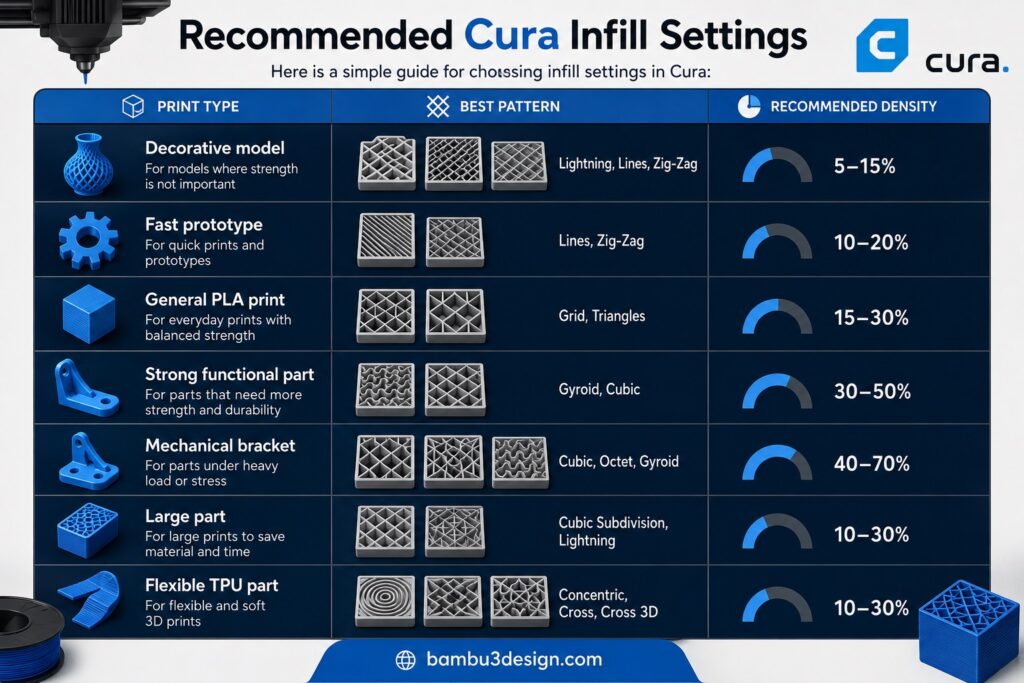
For simple decorative prints, use Lightning, Lines, or Zig-Zag to save time and filament. For everyday prints, Grid and Triangles are reliable choices. For strong functional parts, Gyroid and Cubic are excellent options. For flexible TPU prints, Concentric, Cross, and Cross 3D are better choices.
If you are not sure where to start, use this simple rule:
- Decorative print: Lightning, 10%
- General PLA print: Grid, 20%
- Strong functional print: Gyroid, 30–40%
- Flexible TPU print: Concentric or Cross, 15–25%
By choosing the right infill pattern, you can make your 3D prints stronger, lighter, faster, and more reliable.